Quick Introduction:
If you’ve got a stack of old desktops, dead laptops, or a server room full of retired hardware sitting around, you already know the problem. That equipment takes up space, it might hold sensitive company data and every month it just sits there losing value. The good news is that Dubai has a growing, well-organized market for IT equipment recycling and selling your old computers doesn’t have to be complicated, risky, or a waste of your time.
This guide walks you through everything: why old electronics pile up so fast, how professional IT scrap buyers actually work, what your equipment might be worth, how to wipe your data safely before you let anything go and how to pick a recycling partner you can actually trust. Whether you’re a single laptop owner or an IT manager clearing out a corporate office, this is the practical playbook.
Why Old Computers Pile Up Faster Than You'd Think
Technology moves fast and businesses in Dubai upgrade constantly. A three-year-old laptop that once ran your accounting software smoothly now struggles to open a browser with ten tabs. Warranties expire. Operating systems stop getting security updates. Staff get new machines and the old ones get pushed into a storage room “just in case.”
That “just in case” pile grows every year. Offices, schools, hospitals and government departments across the UAE replace equipment on cycles of two to five years and very few of them have a clear plan for what happens to the old machines. The result is a quiet but serious e-waste problem.
Electronic waste is now one of the fastest-growing waste categories in the world and the Gulf region is no exception. Rapid IT turnover, a strong appetite for the latest devices and a large corporate sector all combine to produce a steady stream of retired computers, laptops, servers and network equipment. Left unmanaged, this equipment ends up in landfills, where it can leak lead, mercury and other hazardous materials into soil and groundwater.
Selling your equipment to a proper computer recycling Dubai provider solves two problems at once. You get equipment and clutter out of your space and you keep hazardous materials out of the environment.
Why Secure Disposal Actually Matters
Here’s something a lot of people underestimate: a used laptop or old office desktop is not just a slab of plastic and metal. It’s a record of everything that was ever typed, saved, browsed, or logged in on that machine. Financial records, client databases, emails, passwords, cached login sessions all of it can still be sitting on a hard drive or SSD even after you’ve dragged files to the recycle bin and emptied it.
Deleting a file doesn’t erase it. It just removes the pointer to where that data lives on the drive. Recovery software can pull deleted files back with very little effort. For a business, that’s a compliance nightmare. For an individual, that’s identity theft waiting to happen.
This is exactly why secure data destruction Dubai services exist as a distinct part of the recycling process, not an afterthought. A responsible IT scrap buyer treats data security as seriously as the hardware itself, using certified wiping software or physical destruction methods and issuing documentation that proves the job was done properly.
What's In It for You: Businesses and Individuals
For Businesses
Free up capital. Old IT assets that would otherwise cost you storage space and disposal fees can actually generate cash back.
Reduce liability. Improperly discarded equipment with recoverable data can expose a company to data breach claims, regulatory penalties and reputational damage.
Simplify IT asset management. A clear disposal process means your IT asset management records stay clean and audits go smoother.
Support sustainability goals. More companies in Dubai are expected to report on environmental practices. Documented, certified recycling supports those commitments.
Free up office or warehouse space. Storage rooms full of old monitors and towers are expensive real estate to waste.
For Individuals
- Turn dead weight into cash. Even a laptop that won’t turn on can have components worth buying.
- Avoid the guesswork of “where do I even take this?” A collection service picks up directly from your home or office.
- Get peace of mind on your personal data. Photos, saved passwords, banking apps and personal documents get properly wiped, not just deleted.
- Do the right thing environmentally without having to research recycling regulations yourself.
How IT Scrap Buying Actually Works
Selling to an IT scrap buyer isn’t like listing something on a resale marketplace and hoping a stranger shows up. A professional operation runs on a structured process designed for both individual sellers and large-scale corporate IT disposal.
Here’s the general flow most legitimate buyers follow:
- Initial inquiry and equipment list. You reach out by phone, form, or email with a rough list of what you’re selling: quantity, device types, age and condition.
- Quote or estimate. Based on your description, the buyer gives you a ballpark value or arranges an on-site inspection for larger volumes.
- Collection or drop-off. For businesses with multiple devices, most buyers offer pickup. Individuals with one or two items can often drop equipment off directly.
- Inspection and sorting. Equipment gets assessed for working condition, reusability and component value.
- Data wiping or destruction. Any device with storage gets its data securely erased or physically destroyed, with certification provided on request.
- Refurbishment, resale, or material recovery. Working equipment may be refurbished and resold. Non-working devices get broken down so usable components and raw materials can be recovered.
- Payment. You get paid based on the agreed valuation, either on collection or after inspection, depending on the buyer’s process.
- Documentation. For businesses in particular, you should receive a certificate of recycling and, where applicable, a certificate of data destruction.
Step-by-Step: How to Sell Your Old Computers
If you’re doing this for the first time, here’s a simple sequence to follow so nothing gets missed.
Step 1: Make a list of everything you’re selling. Include brand, model, age if known and rough condition (working, partially working, dead).
Step 2: Back up anything you need. Photos, documents, saved projects get them onto a cloud drive or external storage before the device leaves your hands.
Step 3: Sign out of all accounts. Email, cloud storage, app store accounts and anything tied to your identity.
Step 4: Request a quote. Reach out to your chosen IT scrap buyer with your equipment list.
Step 5: Schedule pickup or drop-off. Larger volumes almost always justify a pickup service.
Step 6: Confirm data destruction. Ask specifically how they handle data wiping and whether you’ll get a certificate.
Step 7: Get paid and keep your paperwork. Retain any recycling or destruction certificates for your own records, especially if you’re a business with compliance requirements.
What Devices Are Accepted
Most established computer scrap buyers accept a wide range of IT hardware, not just laptops and desktops. Here’s a general breakdown of what’s typically accepted and what usually isn’t.
Accepted vs Non-Accepted Items
| Typically Accepted | Usually Not Accepted (or Accepted Separately) |
|---|---|
| Laptops and desktop computers | Household appliances (fridges, washing machines) |
| Servers and server racks | Furniture and non-electronic office items |
| Monitors (LCD, LED, CRT) | Broken glass or hazardous chemical containers |
| Printers and scanners | Batteries requiring special handling (often accepted, but separately) |
| Network equipment (routers, switches) | Light bulbs and fluorescent tubes (separate e-waste stream) |
| Hard drives and SSDs | Medical devices requiring specialized disposal |
| RAM, motherboards, CPUs | |
| Keyboards, mice, cables | |
| UPS units and power supplies | |
| Tablets and mobile devices |
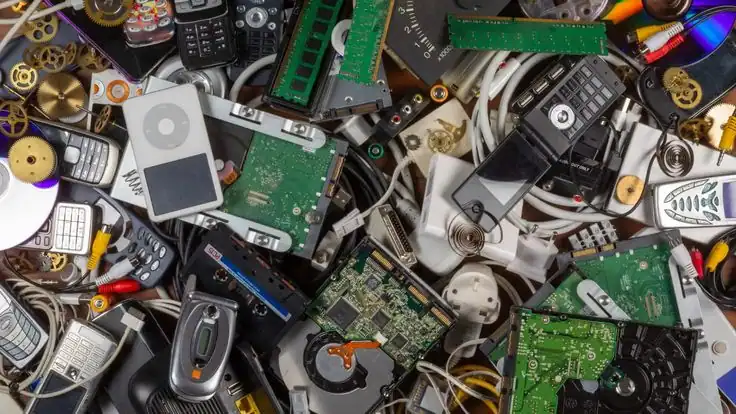
If you’re unsure whether something qualifies, it’s always worth asking directly rather than assuming. Many buyers will take mixed loads that include a few non-standard items alongside your core IT equipment.
What Actually Has Value (and What Doesn't)
Not every retired device is worth the same and that’s fine the goal isn’t just cash, it’s responsible disposal. But it helps to know roughly where the value sits.
Usually holds decent value:
- Working laptops less than 5 years old
- Desktop towers with intact components
- Servers and networking equipment
- Working monitors, especially larger sizes
- Bulk lots of RAM, CPUs and motherboards
- Devices from recognizable brands in working or near-working condition
Usually holds lower or scrap-only value:
- Devices older than 7–8 years
- Cracked or badly damaged laptop screens
- Devices with no hard drive or missing major components
- Very old CRT monitors
- Non-working printers past a certain age
Even in the “lower value” category, these items still matter. They’re not worthless they’re recycled for raw materials like copper, aluminum and rare metals, which keeps them out of landfills and feeds back into the circular economy.
Factors Affecting Price
A few consistent factors drive what a computer scrap buyer will offer you.
| Factor | Impact on Value |
|---|---|
| Age of device | Newer devices generally hold higher resale value |
| Working condition | Fully functional units are worth more than dead ones |
| Brand and model | Recognized business-grade brands tend to hold value longer |
| Specifications | Higher RAM, storage and processor specs increase value |
| Physical condition | Cracked screens, broken hinges, or heavy wear lower value |
| Original accessories | Chargers, cables and original boxes can slightly increase value |
| Volume | Bulk corporate lots often get better per-unit rates |
| Data-bearing components | Drives in good condition add resale value after certified wiping |
| Market demand | Component shortages can temporarily raise scrap material prices |
Preparing Your Computer Before Selling: The Backup Checklist
Before any device leaves your possession, run through this checklist. It takes twenty minutes and saves you from losing something important.
- Back up documents, photos and files to cloud storage or an external drive
- Export browser bookmarks and saved passwords if needed
- Sign out of email, cloud and app store accounts
- Deauthorize the device from any licensed software (Adobe, Microsoft Office, etc.)
- Remove SIM cards or external storage cards, if applicable
- Note down the device’s serial number for your own records
- Confirm with your IT scrap buyer whether you should wipe the device yourself or if they’ll handle it
For businesses, this checklist should be part of a formal offboarding procedure whenever equipment is retired, not something handled ad hoc by whoever happens to be clearing out the storage room.
Secure Data Wiping and Certified Destruction
This is the part that separates a professional operation from a random buyer with a van. There are two main approaches to making sure your data can’t be recovered.
Data Destruction Methods
| Method | How It Works | Best For |
|---|---|---|
| Software-based wiping | Overwrites the entire drive multiple times using certified erasure standards | Drives that will be reused or resold |
| Degaussing | Uses a powerful magnetic field to scramble data on magnetic drives | Older mechanical hard drives being retired |
| Physical shredding | Physically destroys the drive into small fragments | Drives that must never be reused, high-security environments |
| Drive crushing/punching | Physically deforms the drive so it can't spin or be read | Failed drives or drives with critical data |
A trustworthy provider will explain which method applies to your equipment and, for corporate clients especially, provide a certificate of destruction listing serial numbers, the method used and the date. If a buyer can’t explain their data destruction process clearly, that’s a red flag.
Environmental Benefits of Recycling Your Old Computers
Every computer that gets properly recycled instead of dumped keeps a measurable amount of hazardous material out of the environment. Circuit boards contain lead and other heavy metals. Batteries contain materials that shouldn’t sit in open landfill. Screens contain mercury in some older models.
On the flip side, recycled electronics are a genuine resource. Copper wiring, aluminum casings, gold-plated connectors and rare earth elements inside computers can all be recovered and fed back into manufacturing. This is the core idea behind the circular economy: instead of mining new raw materials, industries reuse what’s already been extracted.
Choosing certified recycling also supports broader environmental compliance efforts. The UAE Ministry of Climate Change and Environment has pushed for stronger e-waste management practices and Dubai Municipality has its own regulations around hazardous and electronic waste handling. Internationally, frameworks like the Basel Convention govern the movement of hazardous waste across borders and standards like ISO 14001 and the R2 Standard set benchmarks for environmentally responsible recycling operations. A provider that aligns its processes with these frameworks is doing more than just “recycling” they’re operating inside a recognized system of accountability.
There’s also a carbon footprint angle that often gets overlooked. Manufacturing a new laptop or desktop generates significantly more carbon emissions than refurbishing and reusing an existing one. Every device that gets a second life through resale or refurbishment, rather than being replaced by a brand-new unit, represents a real reduction in emissions tied to manufacturing and shipping.
Business Recycling Advantages
Business Benefits
| Benefit | Why It Matters |
|---|---|
| Compliance support | Helps meet data protection and environmental regulations |
| Cost recovery | Retired assets generate income instead of storage costs |
| Risk reduction | Certified data destruction limits data breach exposure |
| Streamlined IT operations | Clear disposal process fits into existing IT asset lifecycle management |
| Corporate reputation | Documented sustainability practices support ESG reporting |
| Space efficiency | Frees office or warehouse space previously used for storage |
| Employee trust | Staff see that company data and old devices are handled responsibly |
Larger organizations schools, universities, hospitals, government departments, data centers often deal with bulk IT asset disposal on a recurring basis. Setting up a standing relationship with one corporate IT disposal provider, rather than shopping around every time, tends to produce better pricing, faster turnaround and more consistent documentation over time.
Common Mistakes to Avoid
Selling to unverified buyers. Random classifieds listings might get you a slightly higher price for a single laptop, but you lose any guarantee around what happens to your data.
Skipping the data wipe. Assuming “it’s just an old computer” and handing it over without checking how data will be handled.
Mixing personal and business equipment carelessly. Business devices often need documented disposal for compliance reasons don’t let them get lumped in with a casual personal sale.
Not asking for documentation. A certificate of recycling or data destruction is standard practice with a legitimate provider. If it’s not offered, ask for it.
Assuming broken equipment has no value. Non-working devices still hold value for component recovery and material recycling don’t throw them out assuming nobody wants them.
Waiting too long. The older equipment gets, the lower its resale value drops, especially for laptops and desktops where specs age out of relevance within a few years.
Why Choose a Professional IT Scrap Buyer
A professional buyer brings three things a casual sale can’t: verified data security, proper environmental handling and fair, transparent pricing based on actual market value rather than guesswork. They also carry the infrastructure trucks for pickup, secure facilities for storage and processing and trained staff to handle everything from a single laptop to a full office clearance.
This matters most for organizations with recurring needs. Schools and universities cycling through computer labs, hospitals updating diagnostic equipment tied to computers, data centers decommissioning racks of servers these all require a buyer who understands the scale and sensitivity involved, not a one-off transaction.
Why E-Waste Recycling
Ewaste Recycling has built its process around exactly these priorities: secure data handling, certified recycling practices and straightforward customer service. From single laptop pickups to large-scale corporate IT disposal, the team focuses on making the process easy for the seller while making sure every device is handled responsibly on the back end whether that means refurbishment, component recovery, or certified destruction.
For businesses across Dubai and the wider UAE looking for a dependable partner for IT Asset Disposal Services, Computer Recycling Services, or Secure Data Destruction, working with a provider that treats every device as both an environmental responsibility and a security matter makes the entire process simpler and safer.
The Future of E-Waste Recycling in Dubai
Dubai’s push toward smart city infrastructure and digital transformation means IT equipment turnover isn’t slowing down anytime soon. More offices, more data centers, more connected devices all of it eventually needs a responsible exit plan.
Expect to see tighter regulations around e-waste handling, more businesses formalizing IT asset disposal into their operations rather than treating it as an afterthought and growing demand for refurbished and reused equipment as sustainability becomes a bigger part of procurement decisions. Recycling facilities in the region are also expected to expand capacity and improve component recovery technology, which means better value recovery for sellers over time.
For anyone sitting on old IT equipment right now, that trend points one direction: the market for responsible IT recycling in Dubai is only going to get more organized, not less.
Final Takeaway
Old computers and laptops aren’t just clutter they’re a data security responsibility, an environmental consideration and, in most cases, a source of real value you’d otherwise leave on the table. Whether you’re an individual clearing out a home office or a company managing a full IT asset lifecycle, the process comes down to the same fundamentals: back up your data, wipe it securely, choose a buyer who can document what they do and let the equipment go to a facility that will actually recycle or refurbish it responsibly.
Get that right and selling your old IT equipment stops being a chore and becomes one of the easiest, most responsible decisions in your entire equipment lifecycle.
Sell Old Computers in Dubai | Trusted IT Scrap Buyer
If you've got old computers, laptops, or a room full of retired IT equipment taking up space, don't let it sit there losing value or sitting as a data risk. Reach out to Ewaste Recycling for a straightforward quote, secure data destruction and responsible recycling handled from pickup to certification. Whether it's one laptop or an entire office refresh, get it off your hands and into the right hands.
Contact our team today for a free consultation or schedule an e-waste collection for your home or business.
Contact Us
Frequently Asked Questions
1. How much can I sell my old laptop for in Dubai?
It depends on age, brand, specs and working condition. Newer, working laptops from recognized brands hold the most value, while older or damaged units are typically valued for parts and materials.
2. Do I need to wipe my data before selling my computer?
You don’t have to do it yourself, but you should confirm your buyer will securely wipe or destroy the drive. Deleting files alone doesn’t remove them permanently.
3. Can I sell a laptop that doesn't turn on?
Yes. Non-working laptops still have value for component recovery and material recycling, even if they can’t be resold as functioning devices.
4. Does Ewaste Recycling offer pickup service for businesses?
Yes, pickup is typically arranged for bulk equipment, especially for offices, schools and corporate clients with multiple devices to dispose of at once.
5. What happens to my data during recycling?
Data-bearing devices go through secure wiping or physical destruction, depending on the drive type and client requirements, with certification available on request.